ConnectCNC - CNC file transfer and DNC software
ConnectCNC home    EditCNC home
 

DNC / file transfer settings for Delta-Dynapath


Set the following parameters on the machine:

Parameter
Value
Baud rate9600
Data bits7
Stop bits1
ParityEven

Set ConnectCNC as follows:

Common Settings
NameDynapath
Baudrate9600
Data bits7
Stop bits1
ParityEven
Flow controlXon/Xoff
Xon Char.17
Xoff char.19
Portas available

Send Settings
Header String37,13,10
Trailer String37,13,10
The above codes mean "%,CR,LF".
If your program has the percent sign at the beginning and end, leave the Header and Trailer blank.
End of Line Sequence
Recognize custom EOL  
Replace  
Check "%" characterchecked if you have a "%" at the beginning and end of your programs.
Skip empty linesuser's choice
Skip line numbersuser's choice
Skip non printable bytesuser's choice
Skip comments check "(...)" if required
Default folderFolder in which you store this machine's programs
Start transfer delayuser's choice

Receive Settings
Header String  
Trailer String  
End of Line Sequence
Recognize custom EOL  
Replace (checked) 13,10
Check "%" characterchecked if you have a "%" at the beginning and end of your programs.
Skip empty linesuser's choice
Skip line numbersuser's choice
Skip non printable bytesuser's choice
Skip comments check "(...)" if required
Default folderFolder in which you store this machine's programs
Start transfer delayuser's choice

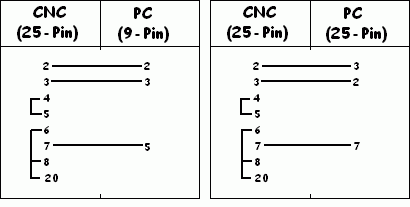
Cable Pin Out

Once you have ConnectCNC and your CNC machines communicating, we strongly suggest you take the following precautions:
- Download some programs, the longer the better, from your CNC to the pc. Save them under a temporary filename so you don't overwrite the original files. Examine themfor errors such as dropped or changed text.
Do this for the first few programs that you use.

These settings have been collected from users of our software and machine tool distributers. We have listed them to help users of ConnectCNC to communicate between their computers and CNC controls.
Since we have no control over the many variables involved, including such things as cable conditions, modifications to machines, condition of computer hardware, etc., we take no responsibility for any damage caused to programs or machines through the use of this software.


Site Map
 ©Copyright CNC Consulting Inc. 1996-2008
Minimum system requirements for our software:
Any computer with Windows95 v950B or higher(32 bit), 98, ME, 2000 XP, NT, Vista.
Hardware requirements will depend on the size of CNC files processed with EditCNC and ConnectCNC.
However, ConnectCNC requires at least one serial COM port, or USB/RS232c port converter.