|
|||
| ⇐ Back to Settings Index | |||
| ConnectCNC Port Settings | |||
| DNC / file transfer settings for Fanuc 0M and OT | |||
|
|
|
Set the following parameters on the machine:
To set the CNC up for drip feed (0M): Set ConnectCNC as follows:
|
|
|||||||||||||||||||||||||||||||||||||||||||||||||||||||||||||||||||||||||||||||||||||||||
|
Cable Pin Out for RS232 COMM port
|
||||||||||||||||||||||||||||||||||||||||||||||||||||||||||||||||||||||||||||||||||||||||||
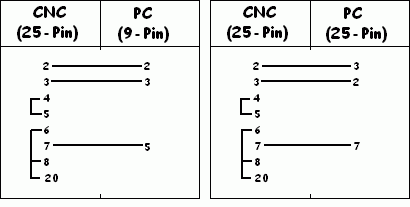
|
Sometimes file transfer will not run, even if all the settings are correct. Go to this page for solutions. If you get a message that the port configurations are not saved, see this page for the solution. |
||
|
Once you have ConnectCNC and your CNC machines communicating, we strongly suggest you take the following precautions: - Download some programs, the longer the better, from your CNC to the pc. Save them under a temporary filename so you don't overwrite the original files. Examine them for errors such as dropped or changed text. Do this for the first few programs that you use. |
||
|
These settings have been collected from users of our software and machine tool distributers. We have listed them to help users of ConnectCNC to communicate between their computers and CNC controls.
|
||